Enterprise Azure Terraform Lab Phase 1.5 Part 1 : Security Baseline Hardening
📁 GitHub Repository: lwc-wk/enterprise-azure-lab1
Enterprise Azure Terraform Lab Phase 1.5 Part 1 : Security Baseline Hardening
🧩 Background
After building the Phase 1 Azure infrastructure foundation, I added a focused security hardening layer.
This phase is not a full AZ-500 lab.
The goal is to demonstrate practical security engineering on top of an AZ-104-style Terraform project:
- Secure Azure resource configuration
- Secret-management foundation
- Managed Identity readiness
- Basic auditability
- Policy as Code
- Production-aware tradeoffs
- Cost control
The rule for this phase is simple:
Do real security controls where they are free or very low cost.
Document production controls where they are expensive or too large for this lab.
This keeps the lab realistic without turning it into an Azure bill generator.
🛡️ Security Baseline Philosophy
Before adding more security services, I documented the intended security baseline.
The baseline covers:
- Identity and access
- Network exposure
- Storage security
- App Service configuration
- Key Vault
- Monitoring
- Cost control
- Known production gaps
The important point is that security controls should be intentional.
This lab avoids adding tools just because they sound impressive. Some production controls, such as Azure Firewall, Bastion, WAF, Microsoft Sentinel, Private Endpoints, and Defender for Cloud paid plans, are documented but not enabled by default.
Why?
Because this is a cost-controlled lab.
The purpose is to show engineering judgment, not credit card endurance.
💾 Storage Account Security Baseline
The lab includes a Terraform-managed Storage Account.
This Storage Account is part of the ephemeral lab layer and is separate from the permanent Terraform backend Storage Account.
The baseline configuration includes:
- Standard tier
- LRS replication
- Minimum TLS 1.2
- HTTPS-only traffic
- Anonymous blob access disabled
- Terraform-managed tags
The key security controls are:
min_tls_version                 = "TLS1_2"
https_traffic_only_enabled      = true
allow_nested_items_to_be_public = false
These settings reduce the risk of insecure transport and accidental public blob exposure.
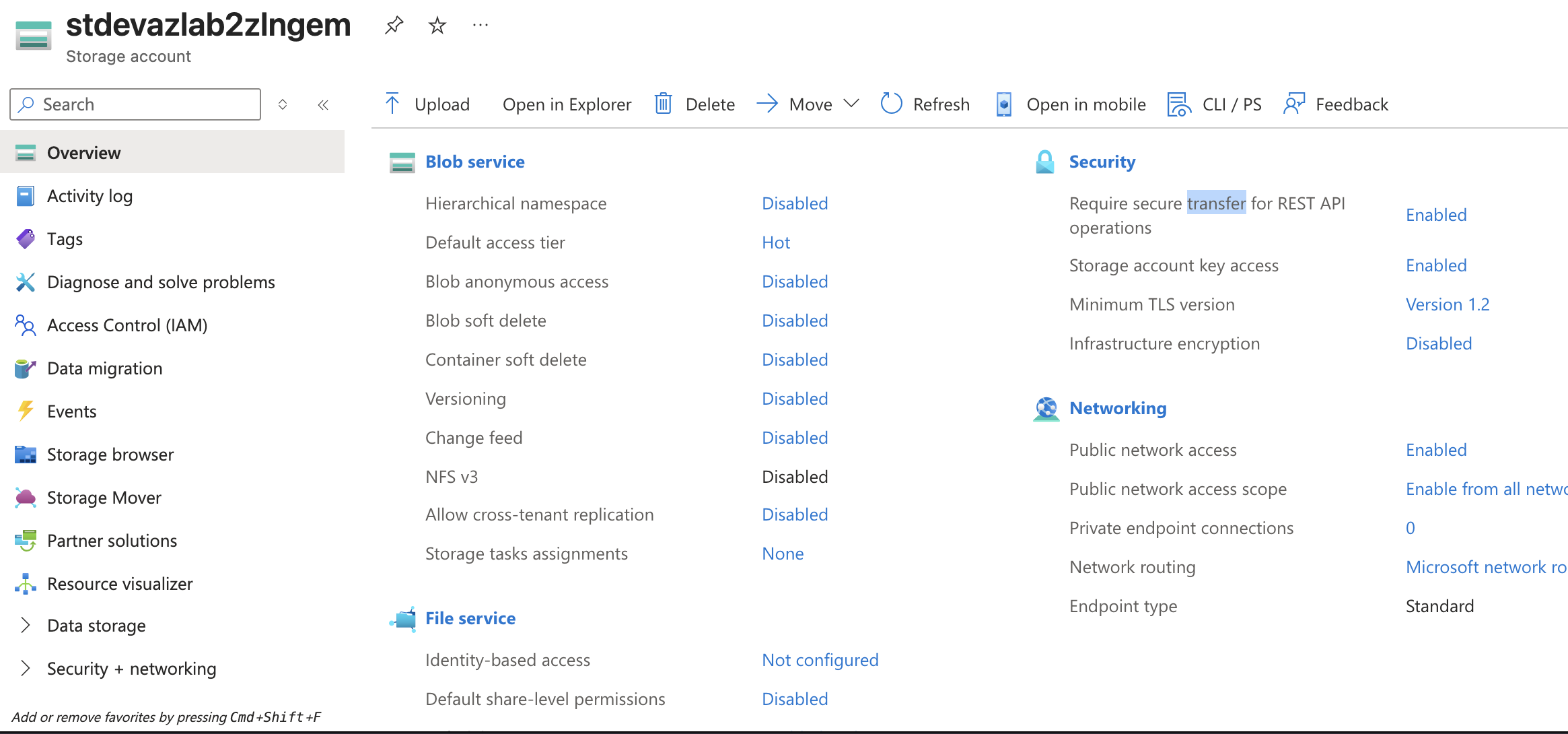
The Storage Account still allows storage account key access in this phase. I intentionally avoided disabling shared key access too early because full Entra ID-based Storage access should be tested later as part of a more deliberate identity phase.
Production hardening could later include:
- Disabling shared key access
- Restricting public network access
- Adding Private Endpoints
- Using Entra ID-based access
- Reviewing Defender for Storage
For this phase, the goal is a practical baseline, not full production lockdown.
🌐 App Service Security Hardening
The lab also includes an Azure Linux Web App.
Phase 1.5 hardens the Web App with baseline security settings:
- HTTPS-only access
- Minimum inbound TLS version
- FTPS-only deployment access
- System-assigned Managed Identity
- Non-sensitive app settings only
Terraform configuration:
resource "azurerm_linux_web_app" "main" {
  name                = "app-${local.resource_name_prefix}-${random_string.suffix.result}"
  location            = azurerm_resource_group.lab.location
  resource_group_name = azurerm_resource_group.lab.name
  service_plan_id     = azurerm_service_plan.main.id

  https_only = true

  site_config {
    always_on           = false
    app_command_line    = "npm start"
    minimum_tls_version = "1.2"
    ftps_state          = "FtpsOnly"

    application_stack {
      node_version = "24-lts"
    }
  }

  identity {
    type = "SystemAssigned"
  }

  app_settings = {
    "APP_ENVIRONMENT" = var.environment
  }

  tags = local.common_tags
}
The App Service Plan remains on the F1 free tier for the default deployment.
always_on is disabled because Always On requires a Basic or higher App Service Plan.
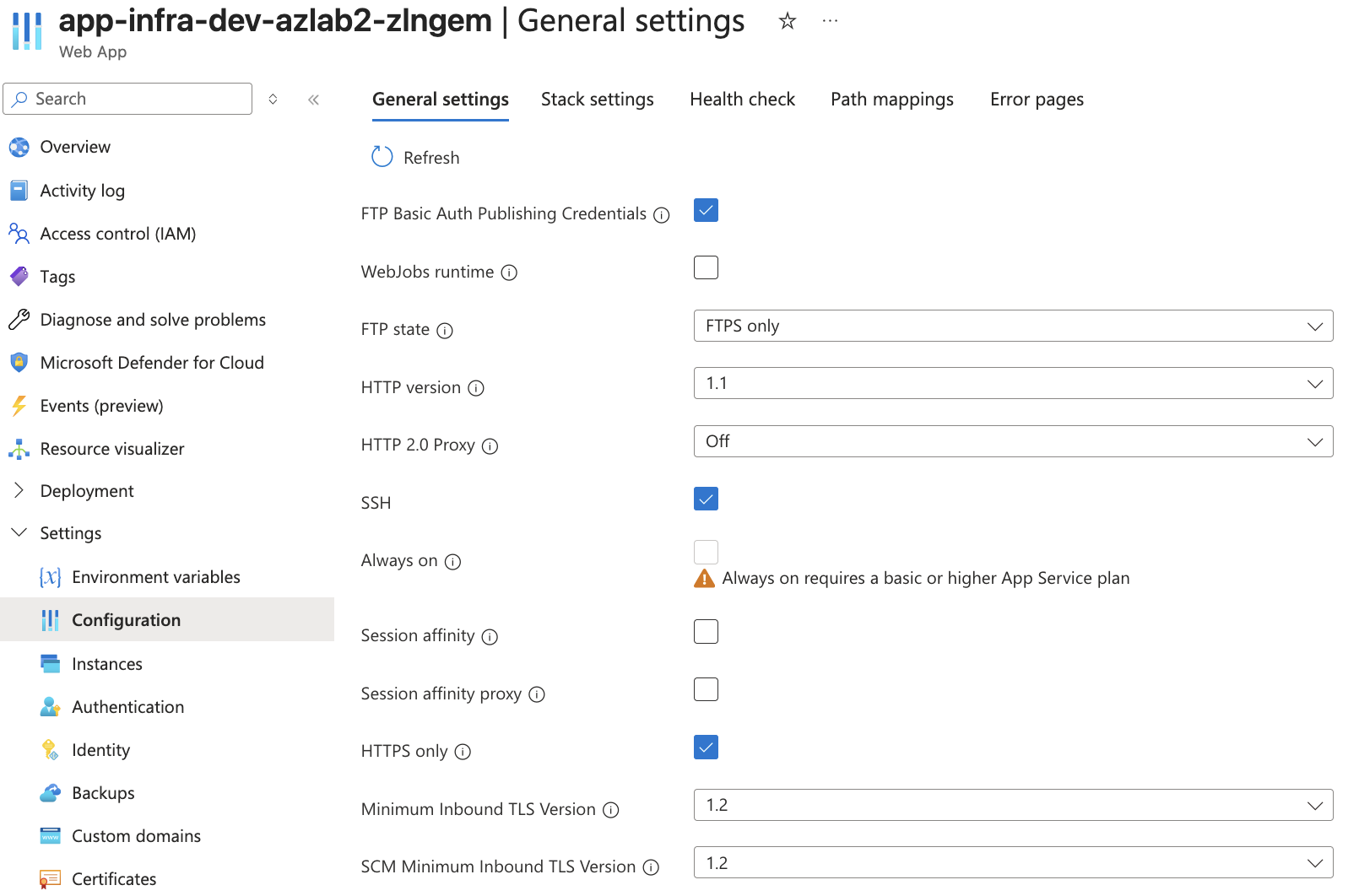
The Web App now has a system-assigned Managed Identity.
This does not automatically grant access to other Azure resources. It only creates the identity.
Managed Identity = identity exists
RBAC assignment  = permission exists
Actual access permissions, such as allowing the Web App to read Key Vault secrets, will be handled later in the identity phase.
🔐 Key Vault Baseline
Key Vault was added as the secret-management foundation for the lab.
The goal is not to build a full SC-300 identity model yet. The goal is to prepare a secure place for future secrets and future Managed Identity integration.
Terraform configuration:
data "azurerm_client_config" "current" {}

resource "azurerm_key_vault" "main" {
  # Key Vault names must be globally unique and 3-24 characters.
  # Use compact naming instead of the full resource prefix.
  name                = "kv-${var.environment}-${var.project_name}-${random_string.suffix.result}"
  location            = azurerm_resource_group.lab.location
  resource_group_name = azurerm_resource_group.lab.name
  tenant_id           = data.azurerm_client_config.current.tenant_id
  sku_name            = "standard"

  rbac_authorization_enabled = true

  soft_delete_retention_days = 7

  # Disabled for lab cleanup so Terraform destroy can complete cleanly.
  # Production environments should evaluate enabling purge protection.
  purge_protection_enabled = false

  tags = local.common_tags
}
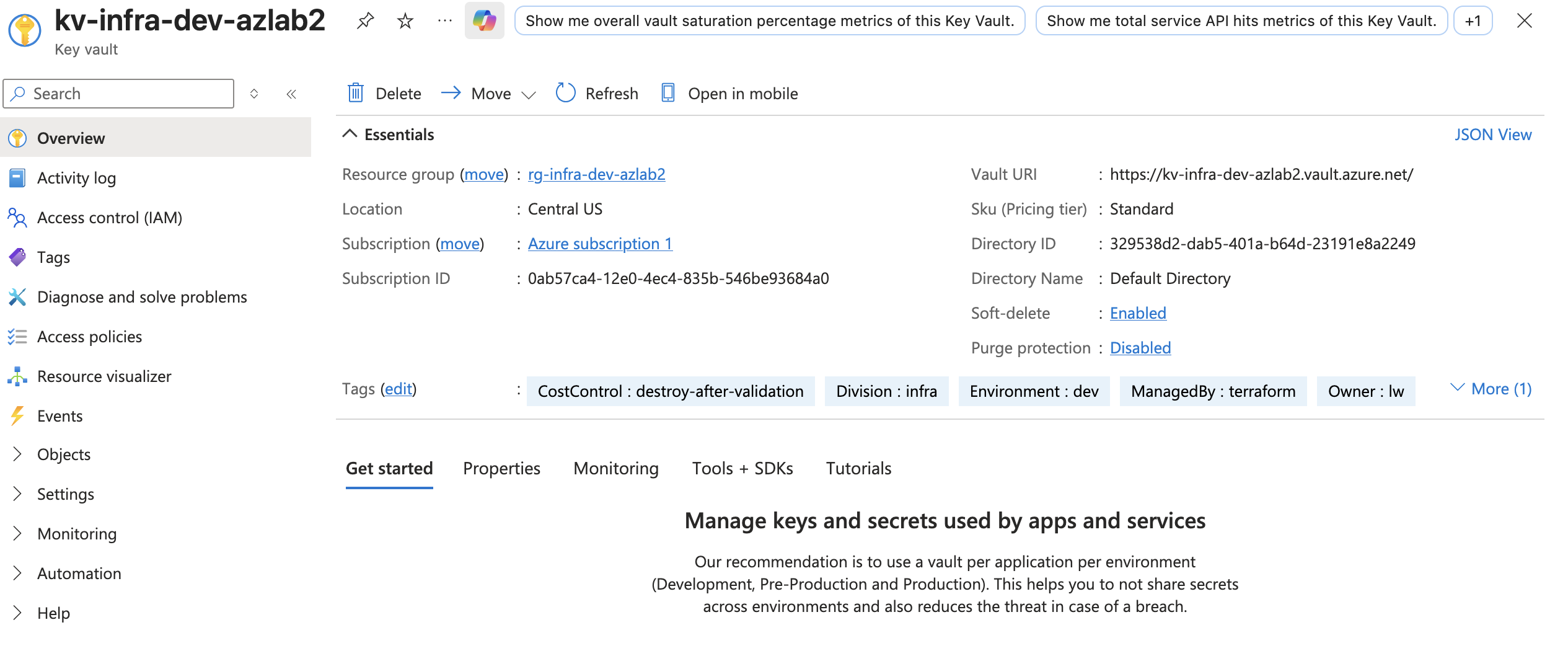
The Key Vault uses the Standard SKU.
Soft delete is enabled, with a 7-day retention period.
Purge protection is disabled because this is a destroyable lab. In production, purge protection should be evaluated carefully to prevent destructive secret loss.
The permission model is set to Azure role-based access control.
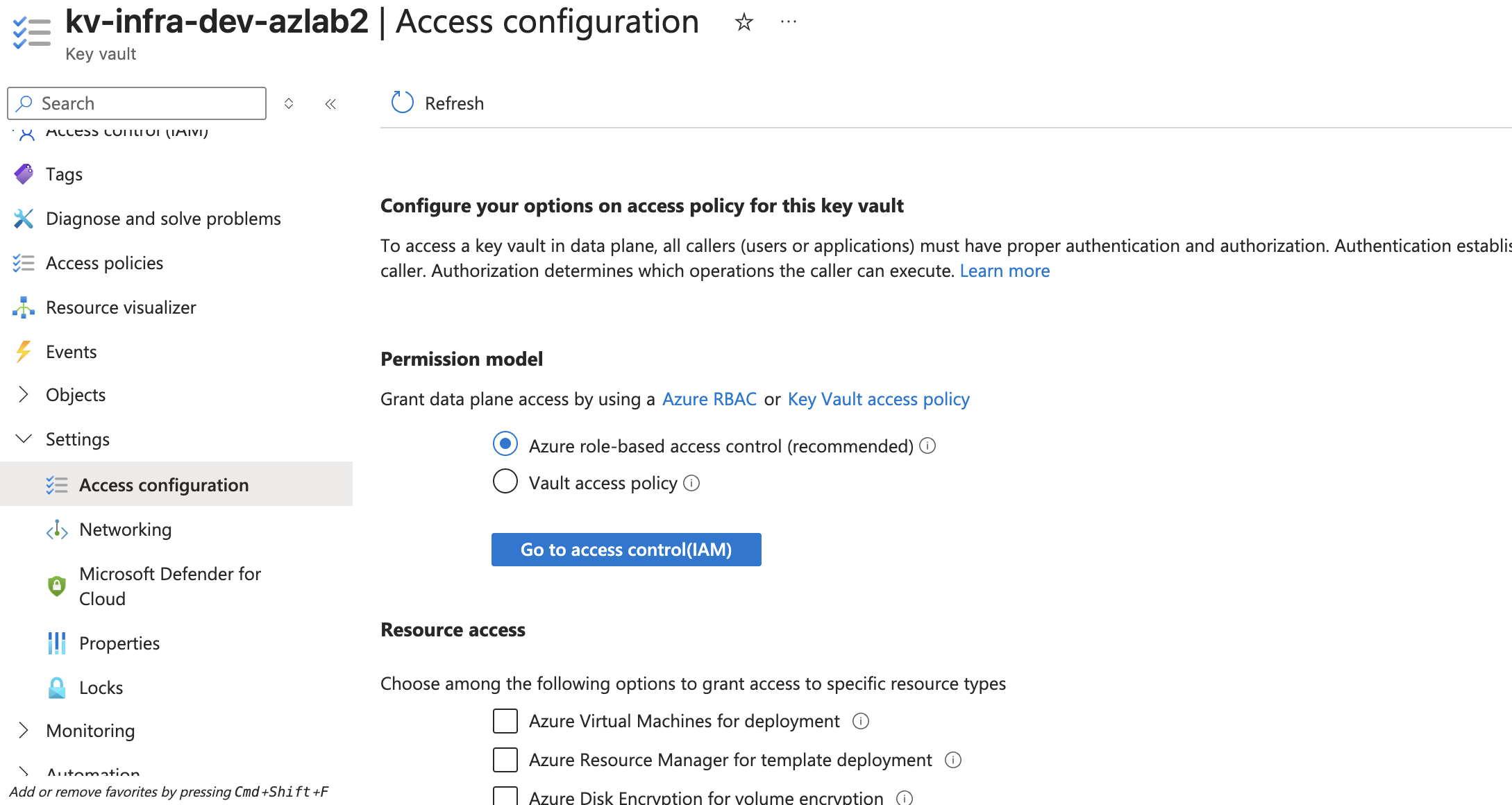
This prepares the lab for least-privilege access management in the identity phase.
📊 Diagnostic Settings and Log Analytics
Phase 1 already created a Log Analytics Workspace.
However, a workspace alone does not collect logs automatically.
Log Analytics Workspace = where logs are stored
Diagnostic Settings     = how resources send logs there
Phase 1.5 connects selected resources to Log Analytics.
The goal is basic auditability without enabling high-volume logging.
Selected diagnostic targets:
- Key Vault audit logs
- App Service HTTP logs
- App Service console logs
- AllMetrics for selected resources
Avoided for now:
- Full Storage diagnostics
- NSG flow logs
- Microsoft Sentinel
- High-volume logging
Terraform configuration:
resource "azurerm_monitor_diagnostic_setting" "keyvault" {
  name                       = "diag-keyvault-${local.resource_name_prefix}"
  target_resource_id         = azurerm_key_vault.main.id
  log_analytics_workspace_id = azurerm_log_analytics_workspace.main.id

  enabled_log {
    category_group = "audit"
  }

  enabled_metric {
    category = "AllMetrics"
  }
}

resource "azurerm_monitor_diagnostic_setting" "app_service" {
  name                       = "diag-appservice-${local.resource_name_prefix}"
  target_resource_id         = azurerm_linux_web_app.main.id
  log_analytics_workspace_id = azurerm_log_analytics_workspace.main.id

  enabled_log {
    category = "AppServiceHTTPLogs"
  }

  enabled_log {
    category = "AppServiceConsoleLogs"
  }

  enabled_metric {
    category = "AllMetrics"
  }
}
For Key Vault, the Azure Portal may show the log category as Audit Logs or through a category group such as audit.

The detailed diagnostic setting sends audit logs and metrics to the Log Analytics Workspace.

For App Service, selected logs are also sent to Log Analytics.

The detailed App Service diagnostic setting includes HTTP logs and App Service console logs.

Log Analytics can then be used to validate that data is arriving.
Example query:
AzureMetrics
| take 10

This proves that monitoring is not just a placeholder resource.
The lab now has a basic path for audit and investigation.
🧯 Production Security Upgrade Plan and Incident Runbook
Because the lab intentionally avoids expensive production services, I documented what would change in a real production environment.
The production security upgrade plan covers:
- Private Endpoints
- Disabling public network access
- Web Application Firewall
- Azure Bastion
- NSG flow logs
- Defender for Cloud paid plans
- Microsoft Sentinel
- Azure Policy
The point is not to ignore production controls.
The point is to explain why they are not enabled by default in a low-cost lab.
Example production reasoning:
Private Endpoints would be considered for Storage Account and Key Vault to reduce public exposure.
This lab does not enable them by default because Phase 1.5 is designed to remain low cost.
The incident response runbook documents simple investigation paths for:
- Suspicious App Service access
- Unexpected Key Vault access
- Storage exposure review
- Unexpected Azure cost increase
Example investigation flow:
Unexpected Key Vault Access
→ Open Log Analytics Workspace
→ Query Key Vault audit logs
→ Identify caller identity
→ Review operation type
→ Review RBAC assignments
→ Rotate affected secrets if needed
This connects directly to the diagnostic settings work.
Diagnostic settings provide the logs.
The runbook explains how to use them.
🏛️ Custom Azure Policy as Code
The original governance demo idea was to assign a built-in policy such as:
Require a tag on resources
However, that type of policy can behave like an enforcement control and may block deployment if a resource is missing the required tag.
For this lab, I wanted governance without breaking Terraform.
So I created a custom Azure Policy definition using the Audit effect.
Missing Owner tag → Audit only
Missing Owner tag → Non-compliant
Missing Owner tag → Does not block Terraform apply
This is a Level 3 Policy as Code example:
Level 2 = assign a Microsoft built-in Azure Policy
Level 3 = create a custom Azure Policy definition and assign it with Terraform
Terraform configuration:
resource "azurerm_policy_definition" "audit_missing_owner_tag" {
  name         = "audit-missing-owner-tag"
  policy_type  = "Custom"
  mode         = "Indexed"
  display_name = "Audit resources missing Owner tag"
  description  = "Audits resources that do not include the required Owner tag."

  metadata = jsonencode({
    category = "Tags"
  })

  parameters = jsonencode({
    tagName = {
      type = "String"
      metadata = {
        displayName = "Tag Name"
        description = "Name of the required tag."
      }
      defaultValue = "Owner"
    }
  })

  policy_rule = jsonencode({
    if = {
      field  = "[concat('tags[', parameters('tagName'), ']')]"
      exists = "false"
    }
    then = {
      effect = "audit"
    }
  })
}

resource "azurerm_resource_group_policy_assignment" "audit_missing_owner_tag" {
  name                 = "audit-missing-owner-tag"
  resource_group_id    = azurerm_resource_group.lab.id
  policy_definition_id = azurerm_policy_definition.audit_missing_owner_tag.id
  display_name         = "Audit resources missing Owner tag"
  description          = "Audits lab resources that do not include the Owner tag."

  parameters = jsonencode({
    tagName = {
      value = "Owner"
    }
  })
}
The policy is scoped only to the lab Resource Group.
It does not affect the entire subscription or the Terraform backend Resource Group.
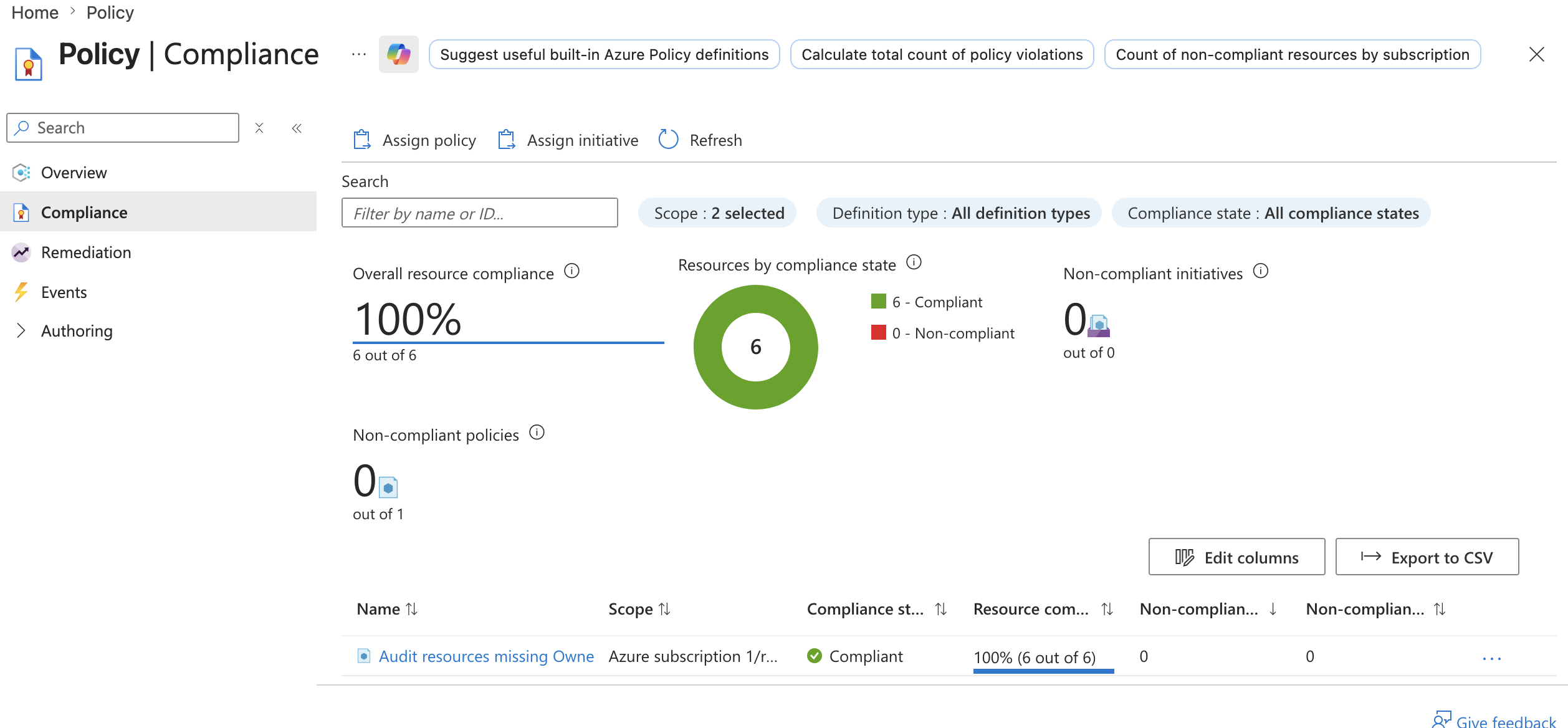
The compliance page shows the custom audit policy in action.
The detailed compliance view shows that the audited resources are currently compliant.
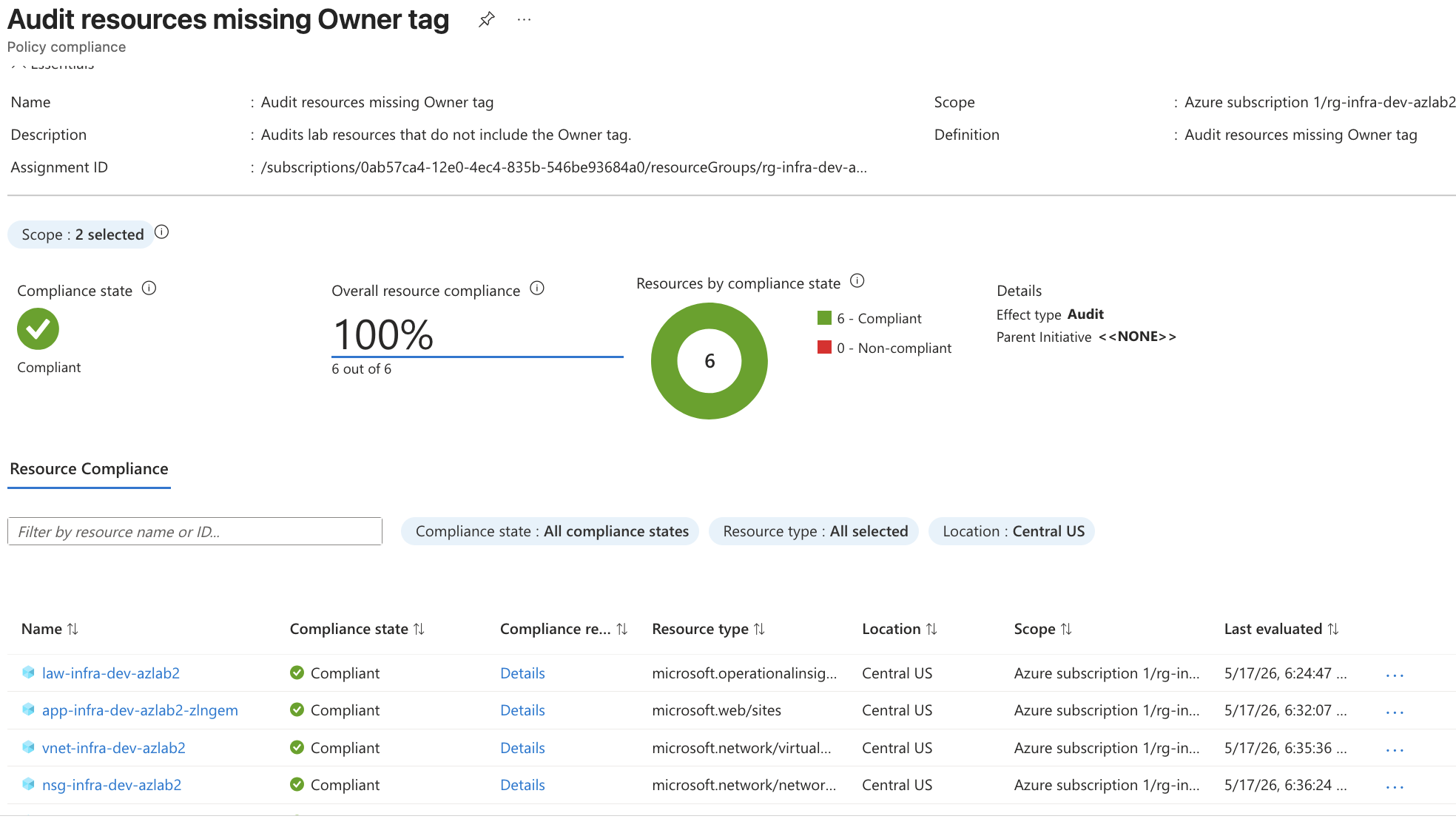
The policy checks whether the Owner tag exists.
It does not validate the tag value.
Examples:
Owner = lw        → compliant
Owner = team-a    → compliant
Owner missing     → non-compliant
This demonstrates governance without using a paid security product and without blocking the lab deployment.
🧾 Summary
Phase 1.5 added a practical security baseline on top of the Azure Terraform lab.
Completed controls:
- Security baseline documentation
- Storage Account secure configuration validation
- App Service HTTPS / TLS / FTPS hardening
- App Service Managed Identity
- Key Vault baseline with RBAC authorization
- Key Vault soft delete
- Minimal diagnostic settings to Log Analytics
- Production security upgrade planning
- Incident response runbook
- Custom Azure Policy audit as Policy as Code
This phase is not a full AZ-500 implementation.
It is a low-cost security hardening layer that proves the lab can be explained from a security engineering perspective.
The most important lesson:
Security maturity is not about enabling every paid security product.
Security maturity is knowing what to enable, what to document, what to defer, and what to destroy.
Phase 1.5 turns the lab from:
I can deploy Azure infrastructure.
into:
I can deploy Azure infrastructure with security baseline thinking, auditability, and production-aware tradeoffs.