Enterprise Azure Terraform Lab Phase 2C Part 4: Monitoring, KQL Queries, and Cleanup
📁 GitHub Repository: lwc-wk/enterprise-azure-lab1
Enterprise Azure Terraform Lab Phase 2C Part 4: Monitoring, KQL Queries, and Cleanup
🧩 Background
After building the identity governance lifecycle with access packages, Terms of Use, Access Reviews, and PIM, I finished the phase with monitoring and cleanup.
This part answers the final operational question:
Can Microsoft Entra identity activity be exported to Log Analytics,
queried with KQL, and cleaned up safely after the lab?
This section covers:
- Microsoft Entra diagnostic settings
- Log Analytics workspace destination
- Audit and sign-in log categories
- KQL query examples
- Cleanup order for temporary governance objects
- Final Phase 2C summary
This is the operational ending of the lab.
The goal is not only to configure identity controls, but also to keep evidence of what happened.
🧭 Monitoring Design
The monitoring flow is:
Microsoft Entra ID
 ↓
Diagnostic settings
 ↓
Log Analytics workspace
 ↓
KQL queries
 ↓
Security review evidence
For this lab, I already had a Log Analytics workspace from the Azure infrastructure phase:
Workspace: law-infra-dev-azlab2
Region: centralus
The purpose of Step 71 is to connect Microsoft Entra identity logs into that workspace.
📊 Diagnostic Settings Start State
I opened Microsoft Entra diagnostic settings.
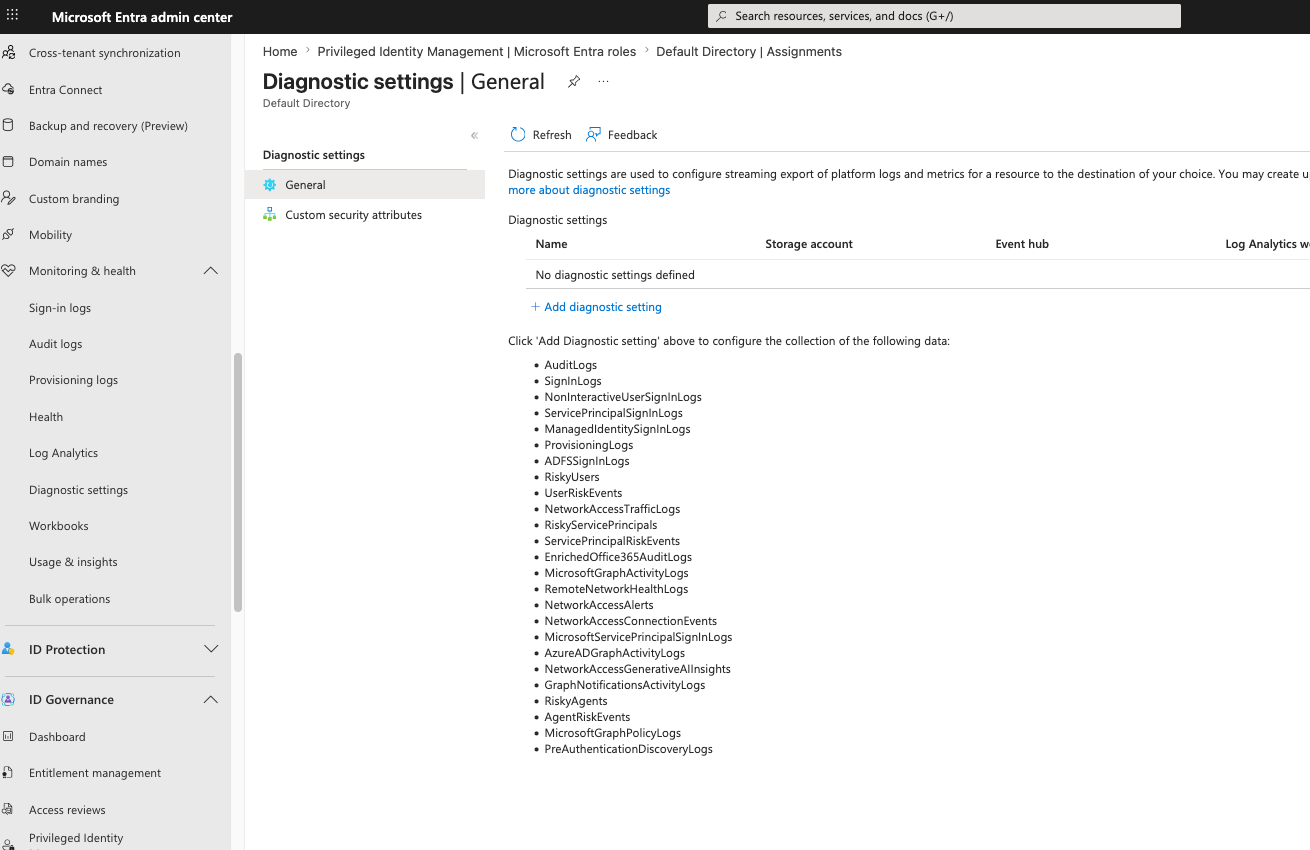
The tenant initially had no diagnostic setting configured.
The portal showed available log categories such as:
AuditLogs
SignInLogs
NonInteractiveUserSignInLogs
ServicePrincipalSignInLogs
ManagedIdentitySignInLogs
ProvisioningLogs
ADFS sign-in logs
Risky users
User risk events
Network access logs
Microsoft Graph activity logs
The key concept:
Microsoft Entra portal reports are useful for investigation,
but diagnostic settings allow logs to be exported for long-term querying and analysis.
🧱 Create Diagnostic Setting
I created a diagnostic setting.
Configuration:
Diagnostic setting name: diag-entra-to-law-enterprise-lab
Destination: Send to Log Analytics workspace
Subscription: Azure subscription 1
Log Analytics workspace: law-infra-dev-azlab2 (centralus)
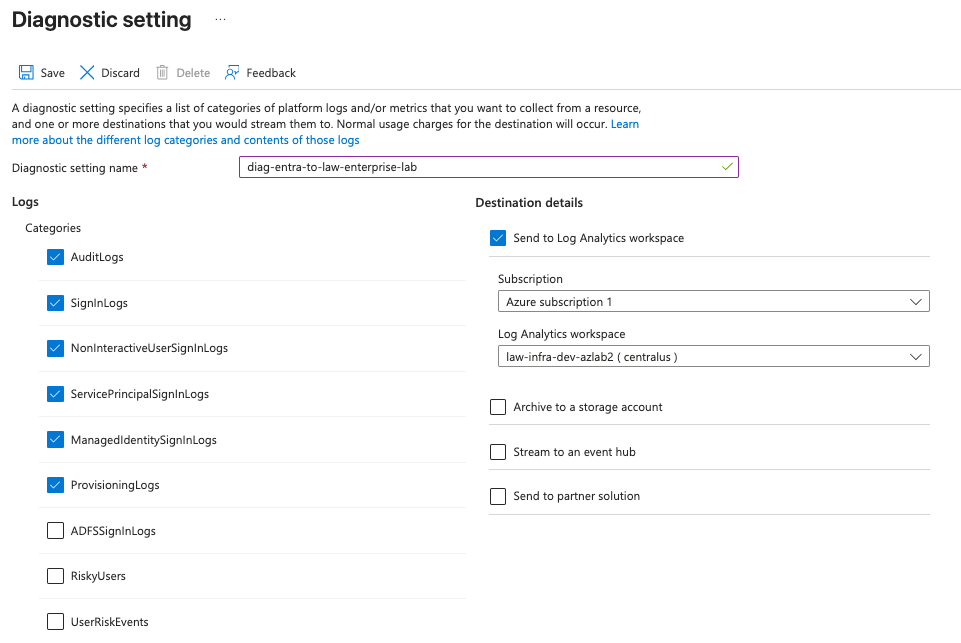
Selected core categories:
AuditLogs
SignInLogs
NonInteractiveUserSignInLogs
ServicePrincipalSignInLogs
ManagedIdentitySignInLogs
ProvisioningLogs
This selection covers the most important lab activity:
| Category | Why it matters |
|---|---|
AuditLogs |
Tracks directory and policy changes |
SignInLogs |
Tracks interactive user sign-ins |
NonInteractiveUserSignInLogs |
Tracks token refresh and non-interactive sign-ins |
ServicePrincipalSignInLogs |
Tracks workload identity sign-ins |
ManagedIdentitySignInLogs |
Tracks managed identity authentication |
ProvisioningLogs |
Tracks provisioning and lifecycle operations |
Risk-related categories were reviewed separately in Step 64.
They can be added later if the lab requires long-term Identity Protection telemetry.
✅ Diagnostic Setting Created
The diagnostic setting was created successfully.
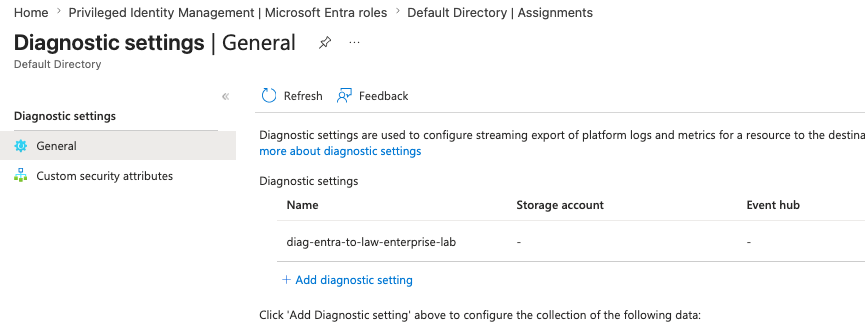
The result:
Microsoft Entra logs are now streamed to Log Analytics.
KQL can be used to query identity activity from the workspace.
This connects the identity governance lab to the monitoring layer.
The important lesson:
Identity controls are incomplete without logs.
Access packages, PIM, Conditional Access, SSPR, and app sign-ins all become much more useful when the resulting events can be queried.
🔎 KQL Query: Recent Sign-ins
This query checks recent interactive sign-ins:
SigninLogs
| where TimeGenerated > ago(7d)
| project TimeGenerated, UserPrincipalName, AppDisplayName, ResultType, ResultDescription, IPAddress, Location
| order by TimeGenerated desc
Purpose:
Confirm who signed in, which application they accessed, and whether the sign-in succeeded or failed.
For this lab, this is useful for validating sign-ins to the enterprise Azure lab app.
🔎 KQL Query: Failed Sign-ins
This query focuses on failed sign-ins:
SigninLogs
| where TimeGenerated > ago(7d)
| where ResultType != 0
| project TimeGenerated, UserPrincipalName, AppDisplayName, ResultType, ResultDescription, IPAddress
| order by TimeGenerated desc
Purpose:
Find blocked or failed sign-in attempts.
This can help validate earlier lab behavior such as blocked app access or failed authentication attempts.
🔎 KQL Query: Conditional Access Result
This query reviews Conditional Access status from sign-in logs:
SigninLogs
| where TimeGenerated > ago(7d)
| project TimeGenerated, UserPrincipalName, AppDisplayName, ConditionalAccessStatus, ResultType, ResultDescription
| order by TimeGenerated desc
Purpose:
Check whether Conditional Access was applied, not applied, failed, or succeeded.
This is useful after creating report-only policies such as:
CA-LAB-Require-ToU-Enterprise-App-ReportOnly
CA-Require-MFA-Enterprise-Lab-App
🔎 KQL Query: Enterprise Lab App Sign-ins
This query filters sign-ins to the lab application:
SigninLogs
| where TimeGenerated > ago(14d)
| where AppDisplayName has "enterprise-azure-lab"
| project TimeGenerated, UserPrincipalName, AppDisplayName, ConditionalAccessStatus, ResultType, ResultDescription
| order by TimeGenerated desc
Purpose:
Validate the application sign-in path for the lab app.
This connects the monitoring layer back to the earlier App Service Authentication and Enterprise Application assignment work.
🔎 KQL Query: Directory Audit Changes
This query reviews recent directory changes:
AuditLogs
| where TimeGenerated > ago(14d)
| project TimeGenerated, OperationName, Result, InitiatedBy, TargetResources
| order by TimeGenerated desc
Purpose:
Review identity configuration changes made during the lab.
This is useful for tracking changes such as group membership, app assignments, Conditional Access policies, access packages, and PIM assignments.
🔎 KQL Query: Access Package and Access Review Activity
This query searches for governance-related audit events:
AuditLogs
| where TimeGenerated > ago(14d)
| where OperationName has_any (
    "access package",
    "access review",
    "Entitlement",
    "Terms of use"
)
| project TimeGenerated, OperationName, Result, InitiatedBy, TargetResources
| order by TimeGenerated desc
Purpose:
Find evidence for Entitlement Management, Terms of Use, and Access Review changes.
This is useful for connecting Step 67, Step 68, and Step 69 back to audit evidence.
🔎 KQL Query: PIM Activity
This query searches for PIM-related events:
AuditLogs
| where TimeGenerated > ago(14d)
| where OperationName has_any (
    "PIM",
    "eligible",
    "Activate",
    "role assignment"
)
| project TimeGenerated, OperationName, Result, InitiatedBy, TargetResources
| order by TimeGenerated desc
Purpose:
Review privileged role assignment and activation activity.
This supports the PIM evidence captured in Step 70.
Important note:
Portal audit views may show PIM activity before it appears in Log Analytics.
Log ingestion can take time.
🔎 KQL Query: SSPR and Password Events
This query looks for password reset and registration-related events:
AuditLogs
| where TimeGenerated > ago(14d)
| where OperationName has_any (
    "password",
    "self-service",
    "authentication method",
    "security info"
)
| project TimeGenerated, OperationName, Result, InitiatedBy, TargetResources
| order by TimeGenerated desc
Purpose:
Review password reset, authentication method, and security information activity.
This connects back to Step 61 and Step 62.
🔎 KQL Query: Workload Identity Sign-ins
This query reviews service principal sign-ins:
AADServicePrincipalSignInLogs
| where TimeGenerated > ago(14d)
| project TimeGenerated, ServicePrincipalName, AppId, ResourceDisplayName, ResultType, ResultDescription
| order by TimeGenerated desc
Purpose:
Review application or workload identity sign-ins.
If the table is not available immediately, it usually means there has not been matching activity yet or the log category has not ingested data.
The lab lesson:
No results is still a useful result when the query and log source are correctly configured.
🧪 Practical Monitoring Notes
For this lab, I selected core identity log categories instead of every possible category.
Reason:
More log categories can increase ingestion volume and cost.
A lab should collect enough data to prove the workflow without over-collecting.
Recommended lab baseline:
AuditLogs
SignInLogs
NonInteractiveUserSignInLogs
ServicePrincipalSignInLogs
ManagedIdentitySignInLogs
ProvisioningLogs
Recommended production expansion:
RiskyUsers
UserRiskEvents
Network access logs
Microsoft Graph activity logs
Additional workload identity logs
The exact set depends on licensing, cost, security requirements, and operational maturity.
🧱 Terraform Position
Some parts of this phase are good Terraform candidates.
Good candidates:
Diagnostic settings
Log Analytics workspace
Security groups
Group memberships
Azure RBAC assignments
App registration and app roles
Be careful with:
Conditional Access policies
PIM assignments
Access packages
Terms of Use
Tenant-wide authentication settings
Reason:
Identity governance controls can lock users out or change tenant-wide behavior.
They should be tested in the portal before automation.
The practical approach:
Portal first for learning and proof.
Terraform later for repeatability.
Report-only before enforcement.
Break-glass excluded from risky policies.
🧾 Phase 2C Final Summary
Phase 2C expanded the lab from basic app authentication into identity governance.
Completed areas:
Administrative Unit
Scoped Entra role assignment
Custom Security Attributes review
Device identity review
Authentication Methods review
SSPR and Password Protection
Advanced Conditional Access review
Identity Protection risk review
External Identities and B2B guest user
Cross-tenant access settings
Entitlement Management access package
Terms of Use
Access Review
Privileged Identity Management
Diagnostic settings and KQL
The full identity governance model is now visible:
Scoped administration
+ Authentication method governance
+ Password reset control
+ Conditional Access
+ Identity risk review
+ External identity boundary
+ Entitlement Management
+ Terms of Use
+ Access Reviews
+ PIM
+ Log Analytics monitoring
This is the practical SC-300 story.
Not every feature was enforced tenant-wide.
That was intentional.
The lab used a safe pattern:
Review tenant-wide controls.
Apply only scoped lab changes.
Use report-only for risky access policies.
Capture screenshots.
Document the design.
Clean up temporary objects.
✅ Final Lesson
The biggest lesson from Phase 2C:
Identity governance is not one product page.
It is a lifecycle.
Users need access.
Administrators need scoped permissions.
Guests need boundaries.
Privileged users need just-in-time activation.
Security teams need logs.
And every risky control needs a rollback plan.
That is the difference between clicking through Microsoft Entra features and actually understanding identity governance.